AI meeting assistants have converged on the same core feature set — live transcription, auto-generated summaries, and action-item extraction — so the real differences come down to accuracy, where the notes end up living, and how the tool handles privacy for sensitive calls.
Table of Contents
Quick overview
- Otter.ai — the most established option, with strong live transcription and a generous free tier.
- Fireflies.ai — broad integration with CRMs and team tools, useful for sales and customer-facing teams.
- Fathom — free for individuals, with a strong focus on speed: highlight clips and summaries are ready almost immediately after the call ends.
- Notion AI — not a dedicated meeting tool, but useful if your notes need to live inside a workspace you already use for everything else.
Otter.ai
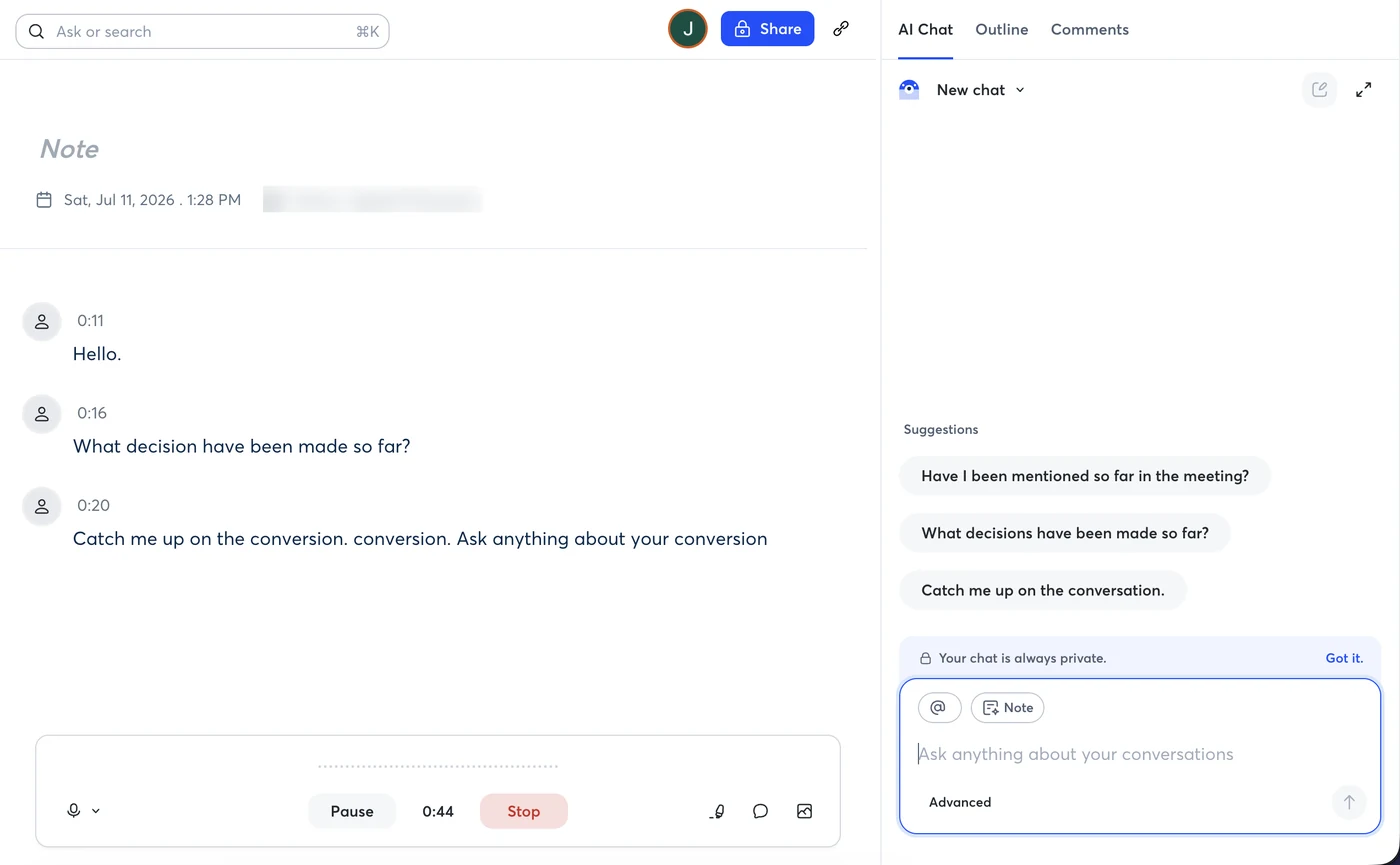
Otter transcribes calls in real time with a live captions view during the meeting itself, not just an after-the-fact summary, and automatically extracts action items and speaker labels. It integrates directly with Zoom, Google Meet, and Microsoft Teams. The free tier covers a meaningful number of monthly transcription minutes; Pro is $16.99/month and Business is around $30/month per user.
Best for: anyone who wants a mature, reliable transcription tool with a usable free tier.
What to check before relying on it: the free tier's monthly minute allowance sounds like a lot until you count real usage — a person with daily half-hour calls burns through it mid-month, which is exactly what the plan is designed to make you feel. Accuracy is strong for clear single-speaker English and degrades with crosstalk, heavy accents, and bad microphones — true of every tool here, but worth calibrating expectations: plan to skim-correct transcripts of messy meetings, not paste them anywhere verbatim. Speaker labeling improves noticeably after you tag a few meetings' worth of voices.
Here's a live recording session from our own free-tier account — timestamps appear as you speak, with the recorder running below and Otter's AI chat suggestions on the right:
Fireflies.ai
Fireflies leans into integrations — it can push meeting notes and summaries directly into CRMs like Salesforce and HubSpot, and supports searching across your entire meeting history for a specific topic or decision. This makes it a stronger fit for sales and customer success teams than for purely internal meetings. Free tier available; paid plans start around $10/month per seat.
Best for: sales and customer-facing teams that need meeting notes synced into a CRM automatically.
The search-across-history feature is Fireflies' quiet differentiator: three months in, being able to ask "when did the client agree to the March deadline?" and land on the exact minute of the exact call is worth more than any single summary. The flip side is the bot presence — Fireflies joins calls as a visible participant, and some prospects react badly to an unannounced recorder. Have a one-line disclosure ready ("we use an AI notetaker, ok if it joins?"), both for etiquette and because consent-to-record laws differ by region.
Fathom
Fathom's standout feature is speed: summaries and highlight clips are typically ready within a minute of the call ending, and the core product is free for individual use, which is unusual in this category. It integrates with Zoom, Google Meet, and Teams, and can push notes into common CRMs on paid team plans.
Best for: individuals and small teams who want a fast, free option without needing deep CRM integration.
The reason "free for individuals" isn't a trick: Fathom monetizes teams, not individuals — the paid tiers sell shared call libraries, coaching features, and CRM sync to managers, while the solo product acts as the funnel. That's a durable freemium model rather than a promo, which matters if you're betting your note archive on it. The highlight-clip feature is more useful than it sounds: marking a moment mid-call and getting a shareable clip afterwards replaces "let me find that in the recording" with a link.
Notion AI
Notion AI isn't built specifically for meetings, but its meeting-notes templates combined with AI summarization mean teams already living inside Notion can keep everything — notes, tasks, and docs — in one workspace instead of adding a separate tool. It's noticeably weaker on live transcription accuracy than dedicated tools. Pricing is an add-on to existing Notion plans, roughly $10/month per member.
Best for: teams already using Notion as their main workspace who want notes to live alongside everything else.
The realistic pattern we see: teams use a dedicated recorder (any of the three above) for capture, then let Notion AI summarize and connect the notes to projects and tasks. Choosing Notion AI instead of a recorder only makes sense for meeting-light teams — if your calendar is call-heavy, transcription quality is the product, and Notion isn't competitive there yet.
How to actually decide
Strip away the feature lists and the decision is three questions. Where should notes live? If the answer is "in the CRM," it's Fireflies; "in Notion," it's Notion AI plus a capture tool; "their own searchable archive," Otter or Fathom. Who pays? Solo and cost-sensitive: Fathom free is the obvious start. How sensitive are your calls? For legal, medical, or HR conversations, read retention and model-training policies before the first recording, not after — and check whether your region requires participant consent for recording at all. Most teams over-shop this category: pick with these three questions, run two weeks of real meetings, and switch only if something concrete hurts.
Quick comparison table
| Tool | Best for | Free Plan | Standard Tier |
|---|---|---|---|
| Otter.ai | Reliable live transcription | Yes | Pro $16.99/mo |
| Fireflies.ai | CRM-integrated sales teams | Yes | From $10/mo/seat |
| Fathom | Fast, free individual use | Yes, free for individuals | Team plans priced separately |
| Notion AI | All-in-one workspace teams | Add-on only | ~$10/mo/member add-on |
Prices change frequently — always confirm current pricing on the provider's own site before subscribing.
Frequently asked questions
Fathom's core product is free for individual use, and Otter.ai's free tier covers a meaningful number of monthly transcription minutes.
Fireflies.ai has the deepest out-of-the-box CRM integrations, which makes it a common pick for sales teams specifically.
Yes — Otter and Fathom can record from a phone or laptop microphone in the room, not just video calls. Accuracy drops with distance and crosstalk, so put the device near whoever talks most and expect rougher transcripts than on headset calls.
Check each provider's data retention and training policies directly before using any AI notetaker on legally sensitive or confidential calls — policies vary and change over time.
This article is independent editorial content. Velkar AI has no paid or affiliate relationship with Otter.ai, Fireflies.ai, Fathom, or Notion at the time of writing. See our Affiliate Disclosure for our general policy.