Motion and Reclaim.ai get shortlisted together because both "AI-schedule your day," but they answer different questions. Motion asks: what should you be working on right now? It's a project manager that owns your calendar. Reclaim asks: how do we defend your calendar from everyone else? It's a bodyguard for time you've already decided matters. People bounce off these tools when they buy the philosophy they don't actually want.
Motion — the opinionated day-planner (~$19/mo billed annually)
Feed Motion your tasks, deadlines, and priorities and it builds your day hour-by-hour, continuously replanning as meetings land and tasks slip. It effectively replaces a task manager and a chunk of project tooling — that's the value and the commitment. It works best for people whose work is deadline-driven task execution (freelancers juggling clients, small delivery teams) and who'll actually keep task estimates honest. If you won't maintain the task list, Motion degrades into an expensive to-do app. Team plans add project visibility across members.
What the pricing page won't tell you: the advertised ~$19/month requires annual billing — paying monthly costs noticeably more, and there's no free tier, only a short trial. Budget for the annual number or don't start, because the two-week learning curve (below) means a one-month test tells you almost nothing. Setup effort is real too: Motion is only as good as the task list you feed it, so plan an honest hour of entering tasks with realistic time estimates before judging the auto-planner. Users who skip that step are reviewing an empty engine.
Reclaim.ai — the calendar defender (free tier; Starter ~$8/mo)
Reclaim doesn't want your task list. It protects habits (gym, deep work, lunch — flexibly rescheduled, never deleted), auto-schedules focus blocks around meetings, adds buffer time, and syncs personal calendars so colleagues can't book over your life. It lives inside Google Calendar rather than replacing anything. The free tier is genuinely usable; Starter at ~$8/month lifts the limits. It's the right pick for meeting-heavy calendar workers whose problem is fragmentation, not task prioritization.
Reclaim's free tier is the rare one that's genuinely decision-grade: you get the core habit protection and smart scheduling with caps on how many habits and calendars you can connect, which is enough to live with it for a few weeks and know whether the philosophy fits. The catch to check before committing is calendar ecosystem — Reclaim grew up on Google Calendar and is still strongest there. If your company runs Outlook, verify current support for your exact setup first, and if you're deep in Microsoft land, Motion's native Outlook support may decide the question for you regardless of philosophy.
Side by side
| Motion | Reclaim.ai | |
|---|---|---|
| Core philosophy | Plans your work for you | Protects time you chose |
| Replaces your task manager | Yes, by design | No — pairs with one |
| Calendar support | Google & Outlook | Google (strongest); Outlook support expanding |
| Free plan | No (trial) | Yes, usable |
| Price | ~$19/mo (annual) | Starter ~$8/mo |
If both feel expensive: the budget end of the category
Motion and Reclaim are the category's premium picks, and it's fair to sanity-check the cheaper end before paying. When we researched the low-cost alternatives, the recurring names were Structured (~$2.99/mo, visual day-planner with light AI), Trevor AI (~$5/mo, time-blocking your task list), Clockwise (~$6.75/user/mo, team focus-time optimization), and BeforeSunset AI (~$8/mo, personal daily planning):
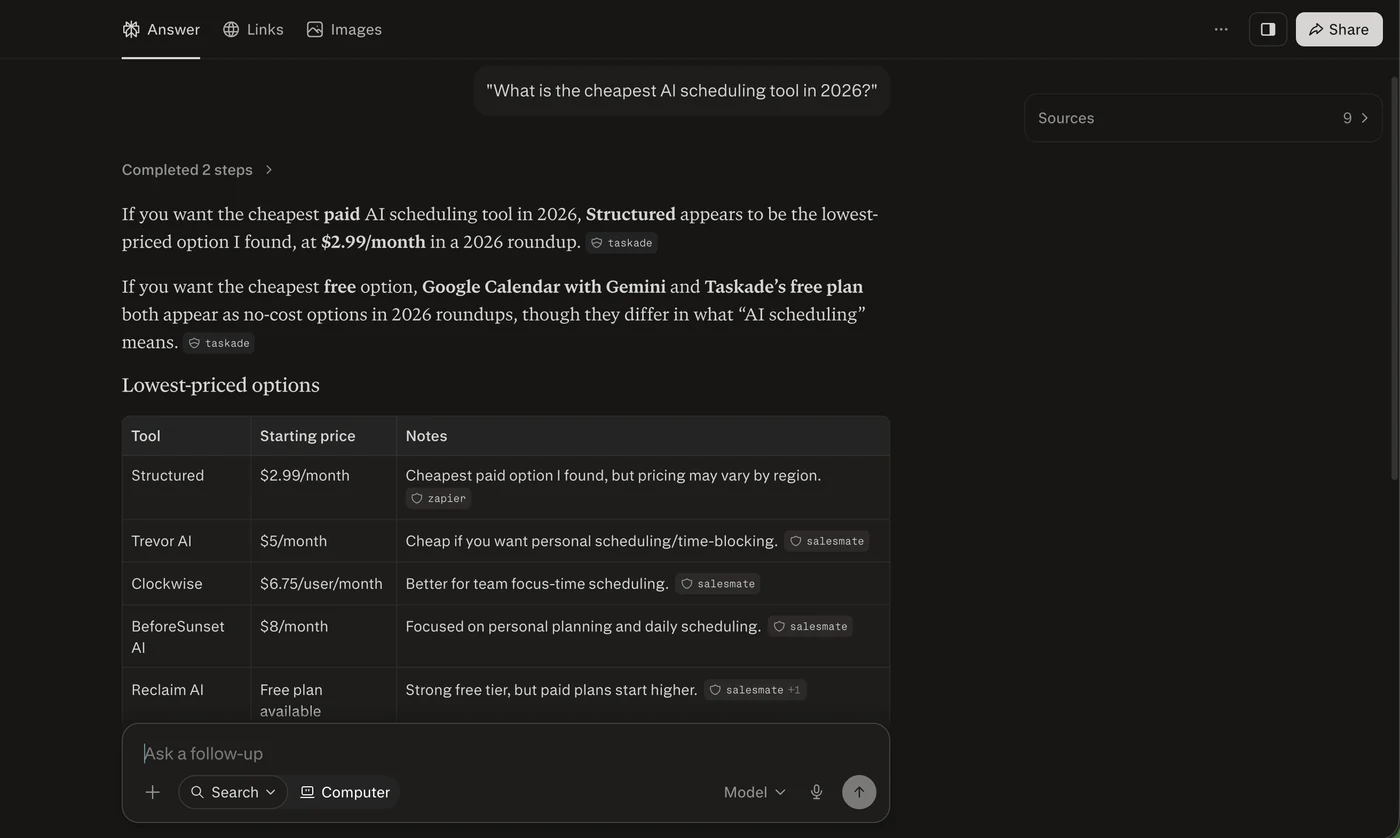
The honest read on these: they're planners you drive, not engines that drive themselves. Structured and Trevor help you lay out your day by hand with AI assists; they don't continuously replan around a moving calendar the way Motion does, and they don't defend your time against other people's invites the way Reclaim does. If your problem is mild enough that a $3–5 planner solves it, that's genuinely good news — but if you needed the automation, you'll be back. Prices above are as listed in mid-2026 roundups; confirm current pricing on each vendor's site.
The two-week wall
Both tools have the same failure mode and neither markets it: the first two weeks feel worse. Your calendar fills with machine-placed blocks, the reshuffling feels chaotic, and the instinct is to override everything — which teaches the AI nothing and convinces you it doesn't work. Users who survive set hard constraints early (protected hours, max meetings per day), resist manual overrides for a fortnight, and then find the system has learned their patterns. Cancel decisions made on day four are made on noise.
Verdict
Task-driven work, willing to maintain estimates, want one tool to run your day: Motion, and its higher price reflects that wider job. Meeting-heavy calendar, existing task system you like, want focus time defended automatically: Reclaim, and start free. They overlap enough that running both is redundant — pick the philosophy, not the feature list. Both appear alongside alternatives in our AI tool directory.
The 30-second decision: answer these three questions honestly. (1) Is your pain "I don't know what to work on" (→ Motion) or "I know, but my calendar keeps getting eaten" (→ Reclaim)? (2) Will you maintain a task list with time estimates every week? If no, Motion is the wrong purchase at any price. (3) Do you need to spend $0 to find out? Then start with Reclaim's free tier — even if you end up on Motion later, two free weeks on Reclaim teaches you which philosophy you actually want.
Frequently asked questions
Motion supports Google and Outlook calendars. Reclaim built on Google Calendar first and remains strongest there — check its current Outlook status before committing if you’re a Microsoft shop.
Both mark protected time as busy without exposing details by default, and both offer team plans with shared visibility settings. Reclaim is particularly good at syncing personal calendars invisibly.
Cheaper, yes — the same thing, no. Sub-$10 tools like Structured or Trevor AI are AI-assisted day planners you operate manually. Motion's continuous auto-replanning and Reclaim's automatic calendar defense don't have true budget equivalents as of mid-2026; the cheap tools solve lighter versions of the problem.
That’s a different product category — Calendly and friends. Reclaim includes basic scheduling links; Motion has booking pages too. But if links are the whole need, don’t pay for AI planning you won’t use.
This article is independent editorial content. Pricing and plan details were checked against each vendor's own pricing page in July 2026 and can change at any time — always confirm before subscribing. Some links on Velkar AI may be affiliate links; they never affect our verdicts. See our Affiliate Disclosure and editorial process.